



We’re excited to share a wave of new updates designed to help schools work smarter, deepen connections, and make everyday tasks simpler. From giving administrators centralised control over AI tools, including seamless AI-powered translations, to enhancing mobile experiences and calendar management, these releases focus on clarity, efficiency, and inclusivity.
Whether it’s capturing learning experiences on the go, or providing more consistent insights through Academic Analytics filters, these enhancements are positioned to save time, reduce friction, and empower educators, students, and administrators alike.
 Centralised AI Governance & Permissions
As AI becomes more widely used in schools, managing it effectively is critical. This update provides administrators with a centralised system to manage AI tools, giving schools greater clarity, consistency, and full control.
Previously, AI features like Writing Assistant and AI Assistant were introduced separately, with each with its own activation process and permission settings.. This update brings them together into a more streamlined and unified hub, making it easier for schools to understand, manage, and oversee how AI is used.
Administrators can view all AI tools, enable or disable them at the school level, and control access directly, without the need for external requests.
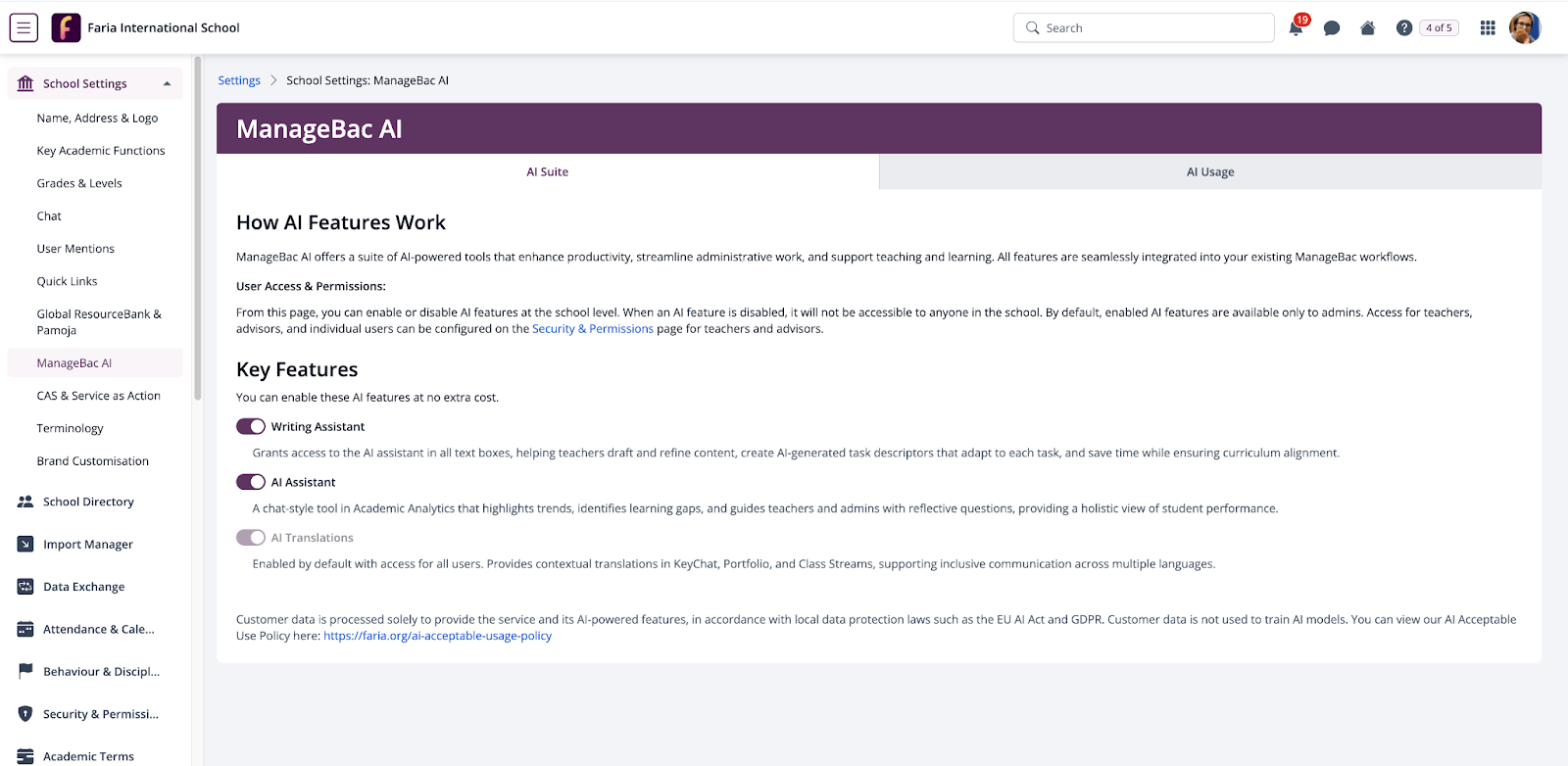
The update also adds AI usage visibility, allowing schools to track how tools are being leveraged. In addition, Writing Assistant and AI Assistant can now be managed independently, giving schools more flexibility in how they roll out AI.
Overall, these enhancements simplify AI management and give schools the control and insight they need to use AI confidently and responsibly.
 AI Translations for China
We’ve just made it easier for school communities in China to communicate, collaborate, and truly understand one another. The launch of AI-powered translations across key areas of ManageBac+ enables students, parents, and teachers to connect in their preferred language, breaking down daily communication barriers.
In multilingual schools, language shapes participation, engagement, and belonging, and when communication isn’t accessible, important context can be lost. This is where AI Translations make a real difference. Users can now translate text with a simple long-press across some of the most important areas of ManageBac:
- Chat messages
- Portfolio reflections and comments
- Class discussions
- Year Group discussions
- Class Stream posts
No need to switch apps or interrupt workflows. With just a single tap, the text is translated, helping parents stay informed, students participate confidently, and teachers communicate clearly.
This feature is also fully supported on our mobile apps, ensuring seamless translation wherever you are.
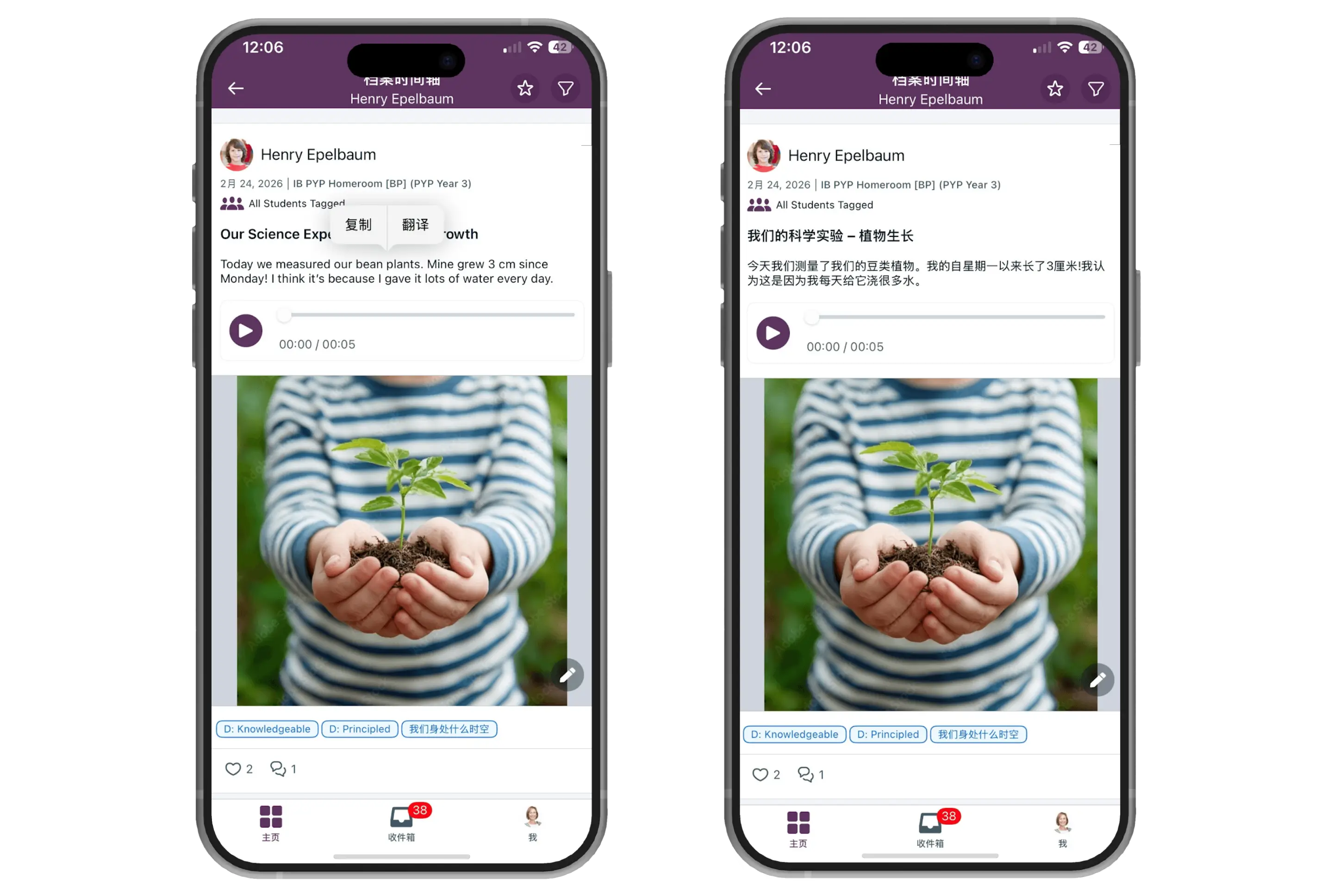
The result? More inclusive conversations, stronger engagement, and a truly connected multilingual community.
 Enhanced Mobile Experiences
Portfolio Reflections (iOS & Android)
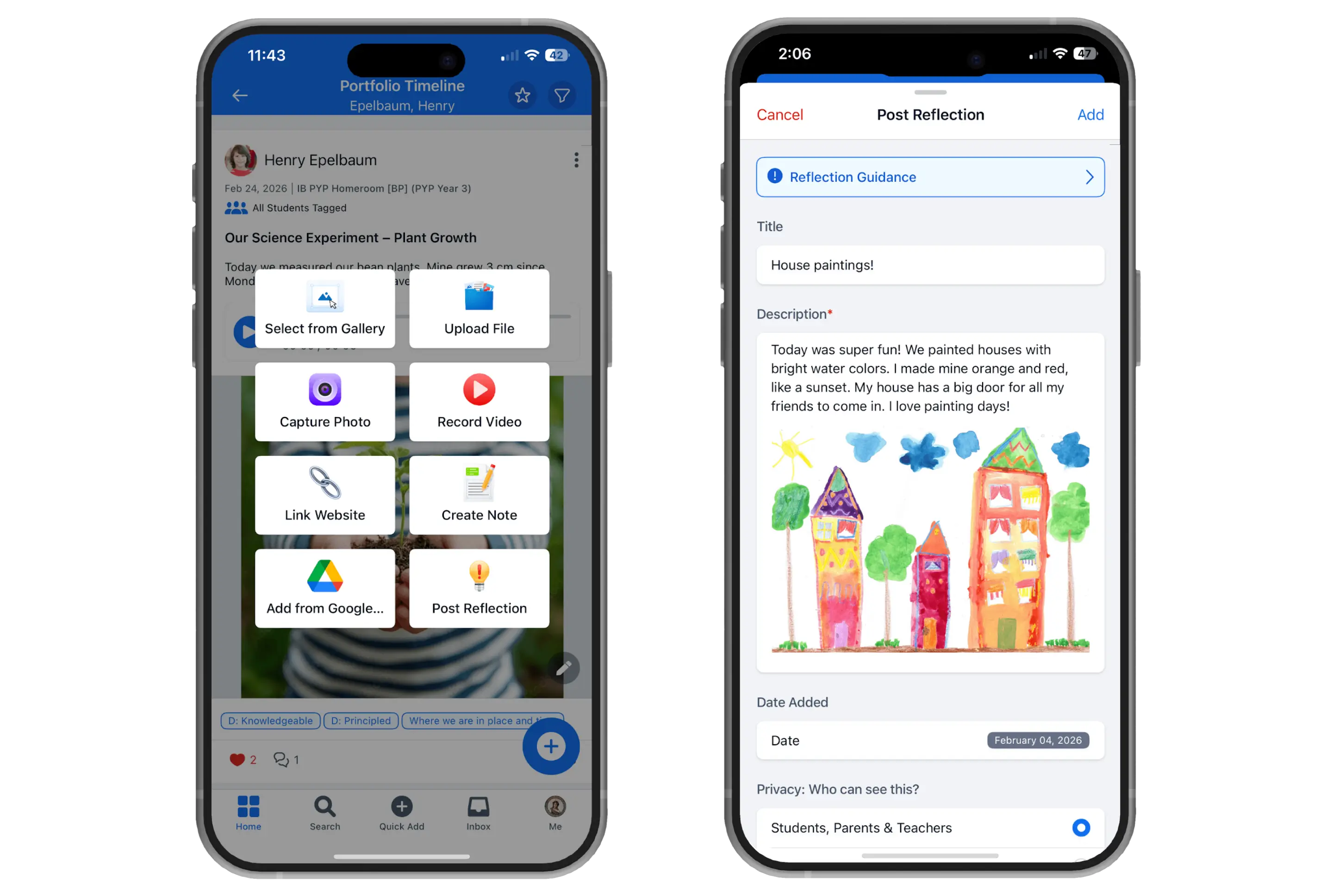
Learning doesn’t just happen at a desk and now, documenting it doesn’t have to either. With Portfolio Reflections available on mobile, students and teachers can capture meaningful learning experiences anytime, anywhere.
Whether it’s a quick photo, a video, an audio reflection, or written notes, users can bring their learning to life through rich multimedia. Reflections can also be tagged with Approaches to Learning, Learner Profiles, and Transdisciplinary Themes, making it easier to showcase growth, context, and deeper understanding.
Adding a reflection is as quick and simple as tapping a button on the Portfolio page to immediately start capturing the moment as it happens.
Turning Feedback into Better Experiences (iOS)
Our new in-app review prompt gives users a simple, seamless way to provide constructive feedback right in the flow of their day-to-day app usage. By capturing feedback in the moment, we’re able to gather more thoughtful, balanced insights.
This approach follows mobile design best practices and helps us better understand what’s working, what’s not, and where we can improve.
All feedback is collected in a dedicated survey, making it easy for our team to review, identify trends, and take prompt action, so we can continuously deliver a better experience for everyone.
 Full Calendar Enhancement
We’ve updated the Full Calendar page to bring scheduling, planning, and event management directly into your daily workflow, making it faster, clearer, and more intuitive. Via the new “Calendar” link in the left-hand navigation under “My Workspace,” access your full schedule with a single click, rather than navigating through the various sub-menus.
The page now aligns — visually and functionally — with the modernised dashboard calendar, creating a seamless experience across desktop and mobile, with click-based popovers replacing hover states for consistent interaction on touch devices. Event category icons give instant visual cues for Deadlines, Events, and Tasks, while a native Date Picker allows you to jump directly to any month or year.Filtering has been refined with structured category grouping and dynamic Programme and Grade filters, reducing visual clutter and vertical scrolling, so teachers and administrators can focus on the most relevant data for their classes.
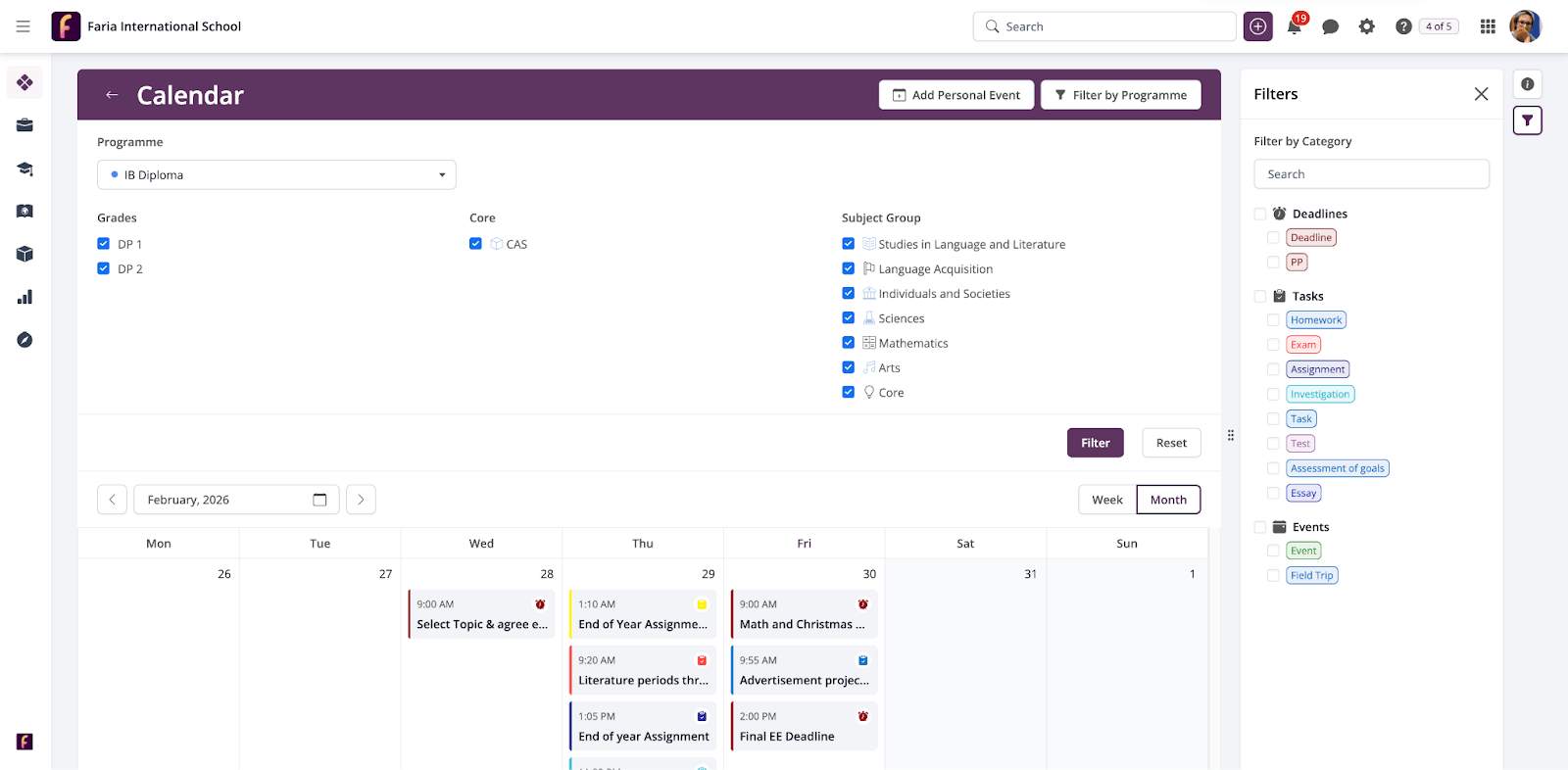
Accessibility has also been a core focus this month. The calendar now meets global WCAG standards, offering full screen reader support, logical keyboard navigation, and high-contrast visuals, ensuring that users with visual or motor impairments can engage fully with their schedules.
By combining faster access, clearer visual hierarchy, smarter filtering, and inclusive design, this update not only saves time and reduces cognitive load but also empowers all users to manage their tasks, lessons, and events efficiently and confidently, supporting a more productive, connected, and inclusive learning environment.
 Major Integration Updates
Faria Suite Integrations Portal
We’re thrilled to announce the launch of the Integrations Portal, a centralised hub designed to empower partners, developers, and school IT teams to seamlessly build, test, and maintain integrations with the Faria Suite. By bringing documentation, tools, and best practices into one place, the portal ensures that anyone working with ManageBac+ can access the most accurate and up-to-date API information, eliminating the need for manual updates and reducing friction in development workflows.
The portal features a consistent, intuitive sidebar navigation and a suite of tools to make integration easier than ever. ‘Ask AI’ allows delivers answers directly from documentation, Test API lets developers interact with endpoints in a secure environment, and Integration Profiles, Endpoints, Best Practices, and Recipes provide clear guidance and practical examples for building robust integrations.
This release is part of our “Future-ready” roadmap, turning today’s solutions into tomorrow’s innovations by providing the architecture and resources that support a wide range of customer needs. Whether you’re troubleshooting API queries, exploring capabilities, or building custom workflows, the Integrations Portal is your single reference point for a smarter, faster, and more reliable integration experience.
WeCom Enterprise SSO for ManageBac+
Managing multiple logins can slow down staff and create unnecessary friction. With the introduction of WeCom Enterprise SSO, teachers and administrators in China can now access ManageBac+ using their existing WeCom credentials, making login faster, simpler, and more secure.
Instead of remembering another username and password, users can now sign in with just a quick QR code scan on their device. This removes barriers to access and helps staff get straight to what matters: teaching, planning, and supporting students. For schools, this brings consistency and control. By connecting ManageBac+ with WeCom, administrators can align access with their existing identity system, ensuring the right people can log in while reducing the need to manage separate accounts.
This update is only available in China and is designed specifically for schools already using WeCom Enterprise as their primary identification system.
 Other Updates
Global Grade filter across Academic Analytics
We’ve made analyzing student performance easier and more consistent by introducing a global Grade filter across Academic Analytics. Now, you can apply a single Grade filter across Programme, Subject Group, Subject, and Class pages, ensuring all charts, tables, and insights update together for the cohort you’re analyzing. This enhancement prevents accidental mixing of DP1 and DP2 data and lays the foundation for future MYP and PYP analytics support.
Updated History Unit Plans for First Assessment 2028
All DP History unit plans have been refreshed to align with the First Assessment 2028 requirements. New sections — Aims, Objectives, Assessment, and Syllabus — are clearly labeled to reflect the new framework, while existing sections have been relabeled as legacy versions (e.g., “Last Assessment 2027”) for easy distinction. Both new and existing unit plans now include pre-populated content from the IB, helping teachers quickly adjust their planning and instruction with the latest curriculum expectations.
Additional Language Learner Pathways in PYP
We’ve added support for Additional Language Learner Pathways in the PYP Languages Strands, Scope, and Sequences. This update includes the IB’s supplementary strands for students learning an additional language, covering Interaction, Culture & Identity, and Constructing Text across Phases 1–5. Schools can now select and import these strands along with their descriptions and Scope & Sequence, giving PYP teachers the tools to plan more effectively for multilingual learners.
To learn more about any of these features, whether you are a ManageBac+ user or not, schedule a free demo with a member of our team.
Want to stay up to date with all the updates or provide your input? Discover our Product Board.