


If your school is already using Google Classroom, Microsoft Teams, or a student information system, you might be wondering whether you actually need a dedicated learning platform at all. Or perhaps you're exploring options and wondering whether these tools will do the job.
It's a fair query, and one we hear often, particularly from schools in cost-conscious markets where free tools are already deeply embedded.
The tools you already have aren't going away, and they shouldn't. But understanding where they stop is the first step to understanding where a dedicated learning platform begins.
In this article, we'll take an honest look at how schools are using Google Classroom, Microsoft Teams, and SIS platforms. We’ll explore what they do well, where they fall short, and how a dedicated learning management platform like ManageBac+ fits into the picture.
Google Classroom: Great for Task Management, Not Programme Delivery
Google Classroom is widely used, intuitive, and free. For general classroom organisation such as posting assignments, collecting work, giving feedback, it does the job well. If your school is already in the Google ecosystem, the integration with Drive, Docs, and Meet makes it a natural fit for day-to-day teaching.
But Google Classroom was built for general education. It has no concept of IB curriculum frameworks, Cambridge programme structures, or the kind of curriculum mapping that international schools require. There is no unit planning aligned to the Programme of Inquiry. There is no CAS tracking. There is no IBIS integration for eCoursework submission or exam registration. Report cards, transcripts, and curriculum-aligned assessment are all outside its scope.
For a school running a single class or a straightforward national curriculum, Google Classroom may be enough. For a school running IB, Cambridge, or multiple programmes simultaneously with coordinators, curriculum leaders, and administrators who need a whole-school view, it quickly becomes a workaround rather than a solution.
How Are Schools Using Google Classroom?
Students hand in their work on Google Classroom, but grades are often manually exported to an external system for reporting, leaving individual teachers siloed with no wider visibility.
Most schools don't move away from Google Classroom, but use it alongside a learning management system like ManageBac+. Any grades entered in Google Classroom are automatically populated into ManageBac+ for easy reporting, and because ManageBac+ integrates natively with Google Workspace, the two work together rather than in competition.
Microsoft Teams: Powerful Collaboration, Limited Programme Management

Microsoft Teams is a collaboration platform first and foremost. In schools that are part of a Microsoft 365 environment, it offers real value: video lessons, file sharing, chat, and assignment management all in one place. For schools in APAC that have adopted Microsoft as their core productivity suite, Teams is often deeply embedded, and the "why pay for something else?" question is understandable.
The challenge is the same as with Google Classroom: Teams was not designed for the specific operational and curricular needs of international schools. Programme standards, unit planning frameworks, IB or Cambridge-aligned assessment, parent reporting, and student portfolio management are all outside what Teams was built to do.
The gap becomes most visible at the coordinator level. An IB DP coordinator managing eCoursework submissions, exam registrations, and CAS records in Teams is doing the work of a platform in a collaboration tool, building workarounds, maintaining spreadsheets, and spending time on administration that a purpose-built system would handle automatically.
How Are Schools Using Microsoft Teams?
Many schools use Microsoft Teams and OneNote as a central repository for academic content. For smaller schools or those early in their IB journey, it can work. Teachers build out folder structures, students access their learning journals through shared links, and it's familiar. As one IB coordinator at an Australian school told us recently: "It's functional, but I don't know if it's inefficient."
That uncertainty tends to grow as schools do. The challenge with Teams isn't that it's bad; it's that it wasn't built for what international schools increasingly need it to do. Coordinators find themselves creating folders and replicating architecture that a purpose-built platform would handle automatically. There's no curriculum mapping, no CAS or service learning tracking, no IBIS integration, and no unified view for parents. The bigger the school gets, the more manual work is required to hold it all together.
A Cambridge school that moved from Microsoft Teams to ManageBac+ did so for exactly this reason: they needed a standardised approach to curriculum delivery and a platform that brought all stakeholders - teachers, students, parents, and leadership - into one coherent system. Teams couldn't give them that.
ManageBac+ integrates natively with Microsoft 365, so schools don't have to abandon the tools their staff already know. Teams and OneNote can continue to support day-to-day collaboration, while ManageBac+ handles the curriculum planning, programme administration, and parent visibility that sits above it.
Your SIS: Student Data Is Not the Same as Learning Management
Student information systems such as iSAMS, PowerSchool, Veracross, and others are the operational backbone of a school. They manage enrolment, timetabling, attendance records, and student data. Many schools assume their SIS covers learning management too, particularly if it has a basic gradebook or report card module built in. It doesn't. At least not at the depth that international schools need.
A SIS manages data about students. An LMS manages the learning experience of students. The distinction matters because the workflows are entirely different. Curriculum planning, unit mapping, formative and summative assessment, student portfolios, service learning, project-based learning, and parent-facing academic reporting are learning management functions. They require a platform built around the pedagogical frameworks your school uses and not a data management system with an attached gradebook.
The good news is that you don't have to choose. ManageBac+ integrates directly with iSAMS, PowerSchool, and other major SIS platforms, providing seamless data sync so your student records stay in your SIS and your learning happens in ManageBac+. You get the operational rigour of a dedicated SIS and the pedagogical depth of a purpose-built learning platform without duplicating data or managing two separate systems manually.
Things to Consider Beyond the Features
Choosing between platforms isn't just a question of what each tool can do. It's a question of what it costs your school — in time, in staff energy, and in the experience you're delivering to your community — when the tool isn't quite right for the job.
Think Efficiency
When a platform wasn't built for your needs, workarounds become part of the job. Grades manually exported from Google Classroom into a separate reporting system. CAS tracked in a spreadsheet because the LMS doesn't support it natively. Parent updates sent via WhatsApp group because the platform doesn't have a proper communication channel. These workarounds are so common in schools using general-purpose tools that they stop feeling like workarounds at all. They just become the job. But they add up. Every manual export, every duplicated entry, every message sent outside the system is time that could have been spent on teaching, coordination, or simply going home on time.
Think Long-Term Scalability
What works for a small cohort in year one looks very different at year three with three times the students and twice the staff. A folder structure in OneNote that a coordinator can manage for five DP students becomes unworkable for fifty. A reporting process that takes an afternoon becomes a week. The right question isn't just "does this work for us now?", it's "will this still work for us in three years, and what will it cost us to change if it doesn't?"
Think Parent Communication and Family Experience
Parents expect visibility. When schools are relying on WhatsApp groups, email chains, or informal updates to bridge the gap between what's happening in the classroom and what parents can see, it's usually a sign that the platform isn't doing that job. A dedicated learning platform gives parents a single, structured window into their child's academic life such as grades, attendance, upcoming tasks, report cards, and direct communication with teachers, without the school having to build that experience manually around tools that weren't designed for it.
The schools that get the most out of ManageBac+ aren't necessarily the ones with the most complex needs. They're the ones that recognised the hidden cost of working around the wrong tools, and decided the time had come to stop.
6 Things to Consider When Choosing an LMS (That Most Schools Overlook)
So What Does ManageBac+ Actually Do That These Tools Don't?
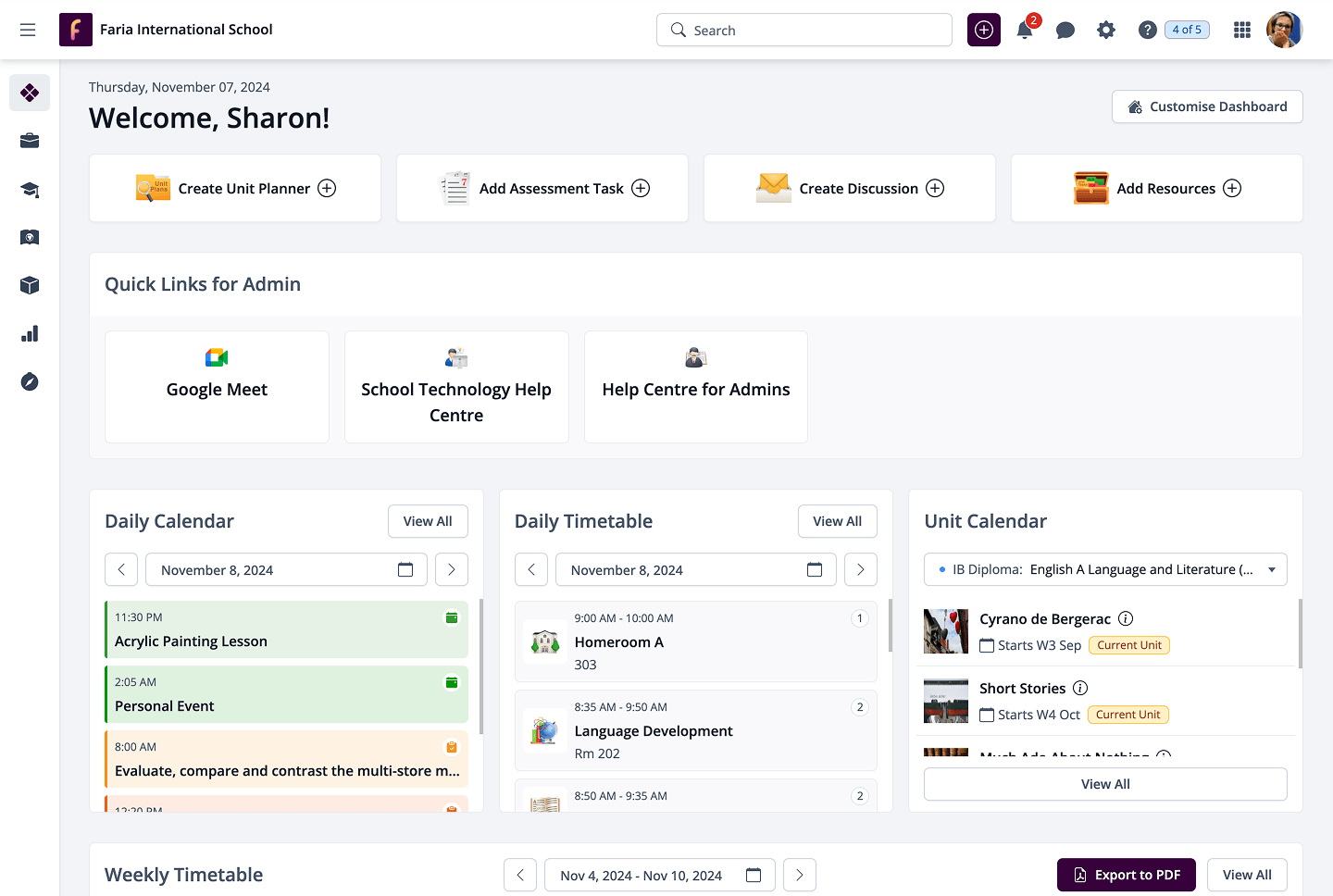
Rather than a feature list, here's the simplest way to think about it: ManageBac+ was built specifically for international schools, from the ground up, for the programmes you run.
That means:
Curriculum planning aligned to IB, Cambridge, Edexcel, AP, and 600+ other academic standards, with unit planning templates that reflect the actual structure of your programme, not a generic framework.
Assessment and reporting that connects your gradebook directly to curriculum-aligned report cards and transcripts, with automated proofing to catch errors before reports go home.
IBIS integration. ManageBac+ is directly licensed by the IB and has been connected to IBIS for over a decade, meaning exam registration and eCoursework submission happen inside the platform, not through a separate manual process.
CAS and project-based learning built natively into the platform for IB DP, MYP, and PYP, not a workaround, not a Google Doc.
A unified parent experience. One portal where families can see their child's academic progress, attendance, upcoming tasks, and communications, accessible on web and mobile.
Multi-curricula support. If your school runs more than one programme, ManageBac+ handles them all within a single account. No switching between systems. No tool sprawl.
Side-by-Side: How the Tools Compare
| Feature | ManageBac+ | Google Classroom | Microsoft Teams | SIS (e.g. iSAMS) |
| IB curriculum planning | ✅ Purpose-built | ❌ Not supported | ❌ Not supported | ❌ Not supported |
| Cambridge / multi-curricula | ✅ Full support | ❌ Not supported | ❌ Not supported | ❌ Not supported |
| IBIS exam registration | ✅ Direct integration | ❌ Manual process | ❌ Manual process | ❌ Not supported |
| CAS / service learning tracking | ✅ Native feature | ❌ Workaround required | ❌ Workaround required | ❌ Not supported |
| Curriculum-aligned report cards | ✅ Built in | ❌ Not supported | ❌ Not supported | ⚠️ Basic only |
| Student portfolios | ✅ Built in | ⚠️ Limited | ⚠️ Limited | ❌ Not supported |
| Parent portal (unified) | ✅ Full portal | ⚠️ Limited | ⚠️ Limited | ⚠️ Basic |
| Attendance management | ✅ Full feature | ❌ Not supported | ❌ Not supported | ✅ Core feature |
| Student data / enrolment | ⚠️ Via SIS integration | ❌ Not supported | ❌ Not supported | ✅ Core feature |
| Google Workspace integration | ✅ Native | ✅ Native | ❌ | ⚠️ Varies |
| Microsoft 365 integration | ✅ Native | ❌ | ✅ Native | ⚠️ Varies |
| 24/7 dedicated support | ✅ Included | ❌ Community only | ❌ Community only | ⚠️ Varies |
| Purpose-built for international schools | ✅ Yes | ❌ No | ❌ No | ❌ No |
The Right Tool for the Right Job
Google Classroom, Microsoft Teams, and your SIS all have an important role to play in how your school operates. The question isn't whether to use them. It's whether they're being asked to do something they weren't built for.
ManageBac+ doesn't replace these tools, it works alongside them. The best outcomes we see are in schools that use each for what it does best: their SIS for student records, Google or Microsoft for day-to-day productivity and collaboration, and ManageBac+ for everything that sits at the intersection of curriculum, learning, assessment, and community.
If you'd like to see how that would work for your specific school setup, we're happy to walk you through it.